Sessions
KOPI AI AGENT automatically saves every conversation as a session. Sessions enable conversation resume, cross-session search, and full conversation history management.
How Sessions Work
Every conversation — whether from the CLI, Telegram, Discord, Slack, WhatsApp, Signal, Matrix, Teams, or any other messaging platform — is stored as a session with full message history. Sessions are tracked in:
- SQLite database (
~/.kopi/state.db) — structured session metadata with FTS5 full-text search, plus full message history
The SQLite database stores:
- Session ID, source platform, user ID
- Session title (unique, human-readable name)
- Model name and configuration
- System prompt snapshot
- Full message history (role, content, tool calls, tool results)
- Token counts (input/output)
- Timestamps (started_at, ended_at)
- Parent session ID (for compression-triggered session splitting)
What Counts Toward Context
Kopi Agent stores session history so it can resume conversations, but it does not keep re-sending every byte it has ever handled. On each turn, the model sees the selected system prompt, the current conversation window, and any content Kopi Agent explicitly injects for that turn.
Media attachments are handled as turn-scoped inputs:
- Images may be attached natively to the next model call, or pre-analyzed into a text description when the active model does not support native vision.
- Audio is transcribed into text when speech-to-text is configured.
- Text documents can have their extracted text included; other document types are usually represented by a saved local path and a short note.
- Attachment paths and extracted/derived text can appear in the transcript, but the raw image, audio, or binary file bytes are not repeatedly copied into future prompts.
For example, if a user sends an image and asks Kopi Agent to make a meme from it, Kopi Agent may inspect that image once with vision and run an image-processing script. Future turns do not automatically carry the original JPEG in context. They carry only whatever was written into the conversation, such as the user's request, a short image description, a local cache path, or the final assistant response.
The most common cause of context growth is not the media file itself. It is verbose text: pasted transcripts, full logs, large tool outputs, long diffs, repeated status reports, and detailed proof dumps. Prefer summaries, file paths, focused excerpts, and tool-backed lookups over copying large artifacts into chat.
Use /compress when a session gets long, /new for a fresh thread, and
kopi sessions prune only when you want to delete old ended sessions from
storage. Compression reduces the active context; it is not a privacy delete.
Pass a name to /new (e.g. /new payments-refactor) to set the new session's
initial title up front — useful for finding it later with /resume <name> or
in the /sessions picker.
Session Sources
Each session is tagged with its source platform:
| Source | Description |
|---|---|
cli | Interactive CLI (kopi or kopi chat) |
telegram | Telegram messenger |
discord | Discord server/DM |
slack | Slack workspace |
whatsapp | WhatsApp messenger |
signal | Signal messenger |
matrix | Matrix rooms and DMs |
mattermost | Mattermost channels |
email | Email (IMAP/SMTP) |
sms | SMS via Twilio |
dingtalk | DingTalk messenger |
feishu | Feishu/Lark messenger |
wecom | WeCom (WeChat Work) |
weixin | Weixin (personal WeChat) |
bluebubbles | Apple iMessage via BlueBubbles macOS server |
qqbot | QQ Bot (Tencent QQ) via Official API v2 |
homeassistant | Home Assistant conversation |
webhook | Incoming webhooks |
api-server | API server requests |
acp | ACP editor integration |
cron | Scheduled cron jobs |
batch | Batch processing runs |
CLI Session Resume
Resume previous conversations from the CLI using --continue or --resume:
Continue Last Session
# Resume the most recent CLI session
kopi --continue
kopi -c

# Or with the chat subcommand
kopi chat --continue
kopi chat -c
This looks up the most recent cli session from the SQLite database and loads its full conversation history.
Resume by Name
If you've given a session a title (see Session Naming below), you can resume it by name:
# Resume a named session
kopi -c "my project"

# If there are lineage variants (my project, my project #2, my project #3),
# this automatically resumes the most recent one
kopi -c "my project"   # → resumes "my project #3"
Resume Specific Session
# Resume a specific session by ID
kopi --resume 20250305_091523_a1b2c3d4
kopi -r 20250305_091523_a1b2c3d4

# Resume by title
kopi --resume "refactoring auth"

# Or with the chat subcommand
kopi chat --resume 20250305_091523_a1b2c3d4
Session IDs are shown when you exit a CLI session, and can be found with kopi sessions list.
Conversation Recap on Resume
When you resume a session, Kopi Agent displays a compact recap of the previous conversation in a styled panel before the input prompt:
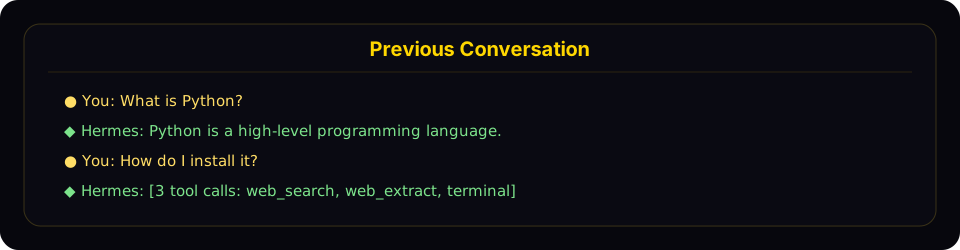
Resume mode shows a compact recap panel with recent user and assistant turns before returning you to the live prompt.
The recap:
- Shows user messages (gold
●) and assistant responses (green◆) - Truncates long messages (300 chars for user, 200 chars / 3 lines for assistant)
- Collapses tool calls to a count with tool names (e.g.,
[3 tool calls: terminal, web_search]) - Hides system messages, tool results, and internal reasoning
- Caps at the last 10 exchanges with a "... N earlier messages ..." indicator
- Uses dim styling to distinguish from the active conversation
To disable the recap and keep the minimal one-liner behavior, set in ~/.kopi/config.yaml:
display:
  resume_display: minimal   # default: full
Session IDs follow the format YYYYMMDD_HHMMSS_<hex> — CLI/TUI sessions use a 6-char hex suffix (e.g. 20250305_091523_a1b2c3), gateway sessions use an 8-char suffix (e.g. 20250305_091523_a1b2c3d4). You can resume by ID (full or unique prefix) or by title — both work with -c and -r.
Cross-Platform Handoff
Use /handoff <platform> from a CLI session to transfer the live conversation to a messaging platform's home channel. The agent picks up exactly where the CLI left off — same session id, full role-aware transcript, tool calls and all.
# Inside a CLI session
/handoff telegram
What happens:
-
The CLI validates that
<platform>is enabled and has a home channel set (run/sethomefrom the destination chat once to configure it). -
The CLI marks the session pending and block-polls the gateway. It refuses if the agent is mid-turn — wait for the current response to finish first.
-
The gateway watcher claims the handoff and asks the destination adapter for a fresh thread:
- Telegram — opens a new forum topic (DM topics if Bot API 9.4+ Topics mode is enabled in the chat, or a forum supergroup topic).
- Discord — creates a 1440-min auto-archive thread under the home text channel.
- Slack — posts a seed message and uses its
tsas the thread anchor. - WhatsApp / Signal / Matrix / SMS — no native threads, falls back to the home channel directly.
-
The gateway re-binds the destination key to your existing CLI session id, then forges a synthetic user turn asking the agent to confirm and summarize. The reply lands in the new thread.
-
When the gateway acknowledges success, the CLI prints a
/resumehint and exits cleanly:↻ Handoff complete. The session is now active on telegram.
Resume it on this CLI later with: /resume my-session-title -
From that point, the conversation lives on the platform. Reply in the new thread — anyone authorized in that channel shares the same session, and any later real user message in the thread joins seamlessly because thread sessions key without
user_id.
Resume back to CLI: when you want to come back to a desktop, just run /resume <title> (or kopi -r "<title>" from the shell) and pick up where the platform left off.
Failure modes:
- No home channel configured → CLI refuses with a
/sethomehint. - Platform not enabled / gateway not running → CLI times out at 60s with a clear message and your CLI session stays intact.
- Thread creation fails (permissions, topics-mode off) → falls back to the home channel directly and still completes; no thread isolation but the handoff itself works.
adapter.sendfails (rate limit, transient API error) → handoff marked failed with the reason; the row clears so you can retry.
Limitation worth knowing: for non-thread-capable platforms with multi-user group home channels, the synthetic turn keys as a DM-style session. This works for self-DM home channels (the typical setup) but isn't ideal for genuinely shared group chats. Threading covers Telegram / Discord / Slack — by far the common case — so most setups never hit this.
Session Naming
Give sessions human-readable titles so you can find and resume them easily.
Auto-Generated Titles
Kopi Agent automatically generates a short descriptive title (3–7 words) for each session after the first exchange. This runs in a background thread using a fast auxiliary model, so it adds no latency. You'll see auto-generated titles when browsing sessions with kopi sessions list or kopi sessions browse.
Auto-titling only fires once per session and is skipped if you've already set a title manually.
Setting a Title Manually
Use the /title slash command inside any chat session (CLI or gateway):
/title my research project
The title is applied immediately. If the session hasn't been created in the database yet (e.g., you run /title before sending your first message), it's queued and applied once the session starts.
You can also rename existing sessions from the command line:
kopi sessions rename 20250305_091523_a1b2c3d4 "refactoring auth module"
Title Rules
- Unique — no two sessions can share the same title
- Max 100 characters — keeps listing output clean
- Sanitized — control characters, zero-width chars, and RTL overrides are stripped automatically
- Normal Unicode is fine — emoji, CJK, accented characters all work
Auto-Lineage on Compression
When a session's context is compressed (manually via /compress or automatically), Kopi Agent creates a new continuation session. If the original had a title, the new session automatically gets a numbered title:
"my project" → "my project #2" → "my project #3"
When you resume by name (kopi -c "my project"), it automatically picks the most recent session in the lineage.
/title in Messaging Platforms
The /title command works in all gateway platforms (Telegram, Discord, Slack, WhatsApp):
/title My Research— set the session title/title— show the current title
Session Management Commands
Kopi Agent provides a full set of session management commands via kopi sessions:
List Sessions
# List recent sessions (default: last 20)
kopi sessions list

# Filter by platform
kopi sessions list --source telegram

# Show more sessions
kopi sessions list --limit 50
When sessions have titles, the output shows titles, previews, and relative timestamps:
Title                  Preview                                  Last Active   ID
────────────────────────────────────────────────────────────────────────────────────────────────
refactoring auth       Help me refactor the auth module please   2h ago        20250305_091523_a
my project #3          Can you check the test failures?          yesterday     20250304_143022_e
—                      What's the weather in Las Vegas?          3d ago        20250303_101500_f
When no sessions have titles, a simpler format is used:
Preview                                            Last Active   Src    ID
──────────────────────────────────────────────────────────────────────────────────────
Help me refactor the auth module please             2h ago        cli    20250305_091523_a
What's the weather in Las Vegas?                    3d ago        tele   20250303_101500_f
Export Sessions
kopi sessions export is one surface for every export format, selected with --format:
| Format | Output | Use it for |
|---|---|---|
jsonl (default) | one JSON object per session | backups, machine round-trip |
md / qmd | one Markdown/Quarto file per session + manifest | readable archives, notes |
html | single self-contained page (sidebar for multi-session) | sharing, browsing |
trace | Claude Code JSONL | HF Agent Trace Viewer, --upload |
Plus --only user-prompts for a prompts-only view (jsonl or md).
All formats share the same selection knobs: --session-id for one session, or the full prune/archive filter set for bulk — --older-than / --newer-than / --before / --after (durations like 5h/2d/1w, bare days, or ISO timestamps), --source, --title, --model, --provider, --cwd, --min/--max-messages, --min/--max-tokens, --min/--max-cost, --min/--max-tool-calls, --user, --chat-id, --chat-type, --branch, --end-reason. --dry-run previews the match set without writing. --redact scrubs secrets (API keys, tokens, credentials) from exported content on any format — recommended for anything you plan to share. Note: bulk filters match ended sessions; unfiltered export dumps everything, including active ones.
JSONL (default)
# Export all sessions to a JSONL file
kopi sessions export backup.jsonl

# Export sessions from a specific platform
kopi sessions export telegram-history.jsonl --source telegram

# Export a single session
kopi sessions export session.jsonl --session-id 20250305_091523_a1b2c3d4

# Redact API keys/tokens/credentials from the exported content
kopi sessions export backup.jsonl --redact
Exported files contain one JSON object per line with full session metadata and all messages.
HTML
--format html writes a single self-contained HTML file — no remote dependencies — with styled message bubbles, collapsible tool output, and (for multi-session exports) a sidebar to switch between sessions:
# One session as a standalone HTML page
kopi sessions export --format html --session-id 20250305_091523_a1b2c3d4 transcript.html

# All Telegram sessions from the last week in one file, secrets redacted
kopi sessions export --format html --newer-than 1w --source telegram --redact archive.html
Prompts Only
--only user-prompts exports just the prompts you wrote — no assistant replies, tool output, or system context. Useful for building prompt libraries or reviewing what you asked:
# One JSONL record per prompt (session id, index, timestamp, text)
kopi sessions export prompts.jsonl --session-id 20250305_091523_a1b2c3d4 --only user-prompts

# Markdown, straight to stdout
kopi sessions export - --session-id 20250305_091523_a1b2c3d4 --only user-prompts --format md
Works with --format jsonl (default) or md, honors the same filters for bulk export, and combines with --redact.
Traces (HF Agent Trace Viewer)
--format trace emits Claude Code JSONL — the transcript shape the Hugging Face Hub auto-detects for its Agent Trace Viewer. Write it locally, or add --upload to push it to your own private kopi-traces dataset (reads HF_TOKEN):
# Trace of the most recent session, to stdout
kopi sessions export --format trace

# One session to a local trace file
kopi sessions export --format trace --session-id 20250305_091523_a1b2c3d4 trace.jsonl

# Upload straight to your private HF traces dataset
kopi sessions export --format trace --session-id 20250305_091523_a1b2c3d4 --upload
Trace exports are secret-redacted by default (they're meant to leave the machine); --no-redact opts out after manual review. --upload is private unless --public. Bulk trace export with filters writes one <id>.trace.jsonl per session.
Markdown / QMD
Pass --format md or --format qmd when you want a readable, file-based archive before hiding or deleting old sessions. Markdown/QMD exports write one file per session into a directory (default: ~/.kopi/session-exports).
# Export one session to Markdown
kopi sessions export --format md --session-id 20250305_091523_a1b2c3d4

# Export a compression lineage as one logical document
kopi sessions export --format md --session-id 20250305_091523_a1b2c3d4 --lineage logical

# Preview ended sessions older than 90 days without writing files
kopi sessions export --format md --older-than 90 --dry-run

# Export ended Telegram sessions older than 2 weeks to QMD files
kopi sessions export --format qmd --older-than 2w --source telegram

# Export long Claude sessions, secrets redacted
kopi sessions export --format md --model sonnet --min-messages 50 --redact

# Only after verification, export and delete one explicitly named session
kopi sessions export --format md --session-id 20250305_091523_a1b2c3d4 --delete-after-verified --yes
Markdown/QMD export writes one .md or .qmd file per exported session plus a manifest.jsonl with the file path, message count, lineage ids, and SHA-256. Bulk export requires at least one filter; a bare bulk export is refused. --delete-after-verified is intentionally limited to --session-id and requires --yes. --redact scrubs secrets (API keys, tokens, credentials) from message content and tool output before writing — recommended for any export you plan to share.
Delete a Session
# Delete a specific session (with confirmation)
kopi sessions delete 20250305_091523_a1b2c3d4

# Delete without confirmation
kopi sessions delete 20250305_091523_a1b2c3d4 --yes
Rename a Session
# Set or change a session's title
kopi sessions rename 20250305_091523_a1b2c3d4 "debugging auth flow"

# Multi-word titles don't need quotes in the CLI
kopi sessions rename 20250305_091523_a1b2c3d4 debugging auth flow
If the title is already in use by another session, an error is shown.
Prune Old Sessions
# Delete ended sessions older than 90 days (default)
kopi sessions prune

# Custom age threshold — bare numbers are days
kopi sessions prune --older-than 30

# Durations work too: 5h, 30m, 2d, 1w
kopi sessions prune --older-than 12h

# Delete only a specific time window (e.g. a batch of test sessions
# created in the last 5 hours)
kopi sessions prune --newer-than 5h

# Explicit window with absolute timestamps
kopi sessions prune --after "2026-07-05 09:00" --before "2026-07-05 14:30"

# Only prune sessions from a specific platform (all ages — any filter
# disables the implicit 90-day default)
kopi sessions prune --source telegram
kopi sessions prune --source cron --older-than 60   # add a time flag to narrow

# More filters — all AND together
kopi sessions prune --newer-than 5h --title "smoke test"   # title substring
kopi sessions prune --older-than 30 --max-messages 3        # tiny sessions
kopi sessions prune --cwd ~/scratch --end-reason done       # by cwd / end reason
kopi sessions prune --model gpt-5 --older-than 1w           # by model (substring)
kopi sessions prune --provider openrouter --older-than 60   # by billing provider
kopi sessions prune --branch feature/old-experiment         # by git branch
kopi sessions prune --user 12345678 --chat-type group       # by messaging origin
kopi sessions prune --max-tokens 500 --older-than 7         # by token usage
kopi sessions prune --max-cost 0.01 --max-tool-calls 0      # cheap, tool-less runs

# Preview what would be deleted, without deleting anything
kopi sessions prune --newer-than 5h --dry-run

# Skip confirmation
kopi sessions prune --older-than 30 --yes
Time values (--older-than, --newer-than, --before, --after) accept a
duration (5h, 30m, 2d, 1w), a bare number of days, or an ISO
timestamp (2026-07-05, 2026-07-05 14:30). --older-than/--before set
the upper bound; --newer-than/--after set the lower bound. Combine both
for a window.
Attribute filters: --source (platform, exact), --title / --model /
--branch (case-insensitive substring), --provider (billing provider,
exact), --end-reason, --user, --chat-id, --chat-type (exact),
--cwd (path prefix), plus numeric bounds --min/--max-messages,
--min/--max-tokens (input+output), --min/--max-cost (USD, actual falling
back to estimated), and --min/--max-tool-calls. Using any filter disables
the implicit 90-day default, so kopi sessions prune --source cron or
--model gpt-4o matches all ages — add a time flag to narrow it. Only a
completely bare kopi sessions prune keeps the 90-day cutoff. Every
non---yes run shows the match count plus the oldest and newest matching
session before asking for confirmation.
Archived sessions are skipped by default; pass --include-archived to
delete them too.
Pruning only deletes ended sessions (sessions that have been explicitly ended or auto-reset). Active sessions are never pruned.
Bulk-Archive Sessions
If you want sessions out of your listings without deleting anything,
kopi sessions archive takes the same filters as prune but soft-hides
matching sessions instead (sets the same archived flag as archiving a single
session from the Desktop/Dashboard UI — messages and search stay intact):
# Archive everything from the last 5 hours (e.g. 75 CI smoke-test sessions)
kopi sessions archive --newer-than 5h

# Archive by title substring, preview first
kopi sessions archive --title "dry run" --dry-run
kopi sessions archive --title "dry run" --yes
At least one filter is required — a bare kopi sessions archive refuses to
archive your entire history. Archived sessions are hidden from
kopi sessions list and /resume but remain in the database and can be
unarchived from the Desktop/Dashboard session list.
Session Statistics
kopi sessions stats
Output:
Total sessions: 142
Total messages: 3847
  cli: 89 sessions
  telegram: 38 sessions
  discord: 15 sessions
Database size: 12.4 MB
For deeper analytics — token usage, cost estimates, tool breakdown, and activity patterns — use kopi insights.
Session Search Tool
The agent has a built-in session_search tool that performs full-text search across all past conversations using SQLite's FTS5 engine — and lets the agent scroll through any session it finds. No LLM calls, no summarization, no truncation. Every shape returns actual messages from the DB.
Three calling shapes
The tool infers what you want from which arguments you set. There's no mode parameter.
1. Discovery — pass query:
session_search(query="auth refactor", limit=3)
Runs FTS5, dedupes hits by session lineage, returns the top N sessions. Each result carries:
session_id,title,when,sourcesnippet— FTS5-highlighted match excerptbookend_start— first 3 user+assistant messages of the session (the goal/kickoff)messages— ±5 messages around the FTS5 match, with the anchor message flagged (the hit in context)bookend_end— last 3 user+assistant messages of the session (the resolution/decisions)match_message_id,messages_before,messages_after
Bookends + window together reconstruct goal → match → resolution without paying for the whole transcript. Typical wall time: 15–50ms on a real session DB.
2. Scroll — pass session_id + around_message_id:
session_search(session_id="20260510_174648_805cc2", around_message_id=590803, window=10)
Returns a window of ±window messages centered on the anchor. No FTS5, no bookends — just the slice. Use after a discovery call when you need more context than the ±5 default window.
- To scroll forward: pass
messages[-1].idback asaround_message_id - To scroll backward: pass
messages[0].idback asaround_message_id - The boundary message appears in both windows as an orientation marker
- When
messages_beforeormessages_afteris less thanwindow, you're at the start or end of the session
Typical wall time: 1–2ms per scroll call.
3. Browse — no args:
session_search()
Returns recent sessions chronologically (titles, previews, timestamps). Useful when the user asks "what was I working on" without naming a topic.
FTS5 query syntax
The keyword mode supports standard FTS5 query syntax:
- Simple keywords:
docker deployment(FTS5 defaults to AND) - Phrases:
"exact phrase" - Boolean:
docker OR kubernetes,python NOT java - Prefix:
deploy*
Optional parameters
sort—newestoroldest, on top of FTS5 ranking. Omit for relevance-only ordering (the default; suitable for exploratory recall). Usenewestfor "where did we leave X" questions,oldestfor "how did X start" questions.role_filter— comma-separated roles to include. Discovery defaults touser,assistant(tool output is usually noise). Passuser,assistant,toolto include tool output (debugging tool behaviour) ortoolto search tool output only.
When It's Used
The agent is prompted to use session search automatically:
"When the user references something from a past conversation or you suspect relevant prior context exists, use session_search to recall it before asking them to repeat themselves."
Typical triggers: "we did this before", "remember when", "last time", "as I mentioned", or any reference to a project/person/concept that isn't in the current window.
Per-Platform Session Tracking
Gateway Sessions
On messaging platforms, sessions are keyed by a deterministic session key built from the message source:
| Chat Type | Default Key Format | Behavior |
|---|---|---|
| Telegram DM | agent:main:telegram:dm:<chat_id> | One session per DM chat |
| Discord DM | agent:main:discord:dm:<chat_id> | One session per DM chat |
| WhatsApp DM | agent:main:whatsapp:dm:<canonical_identifier> | One session per DM user (LID/phone aliases collapse to one identity when mapping exists) |
| Group chat | agent:main:<platform>:group:<chat_id>:<user_id> | Per-user inside the group when the platform exposes a user ID |
| Group thread/topic | agent:main:<platform>:group:<chat_id>:<thread_id> | Shared session for all thread participants (default). Per-user with thread_sessions_per_user: true. |
| Channel | agent:main:<platform>:channel:<chat_id>:<user_id> | Per-user inside the channel when the platform exposes a user ID |
When Kopi Agent cannot get a participant identifier for a shared chat, it falls back to one shared session for that room.
Shared vs Isolated Group Sessions
By default, Kopi Agent uses group_sessions_per_user: true in config.yaml. That means:
- Alice and Bob can both talk to Kopi Agent in the same Discord channel without sharing transcript history
- one user's long tool-heavy task does not pollute another user's context window
- interrupt handling also stays per-user because the running-agent key matches the isolated session key
If you want one shared "room brain" instead, set:
group_sessions_per_user: false
That reverts groups/channels to a single shared session per room, which preserves shared conversational context but also shares token costs, interrupt state, and context growth.
Session Reset Policies
By default gateway sessions never auto-reset (mode: none). You can opt
in to automatic resets via the session_reset section in config.yaml:
- none — never auto-reset (default; context managed by
/resetand compression) - idle — reset after N minutes of inactivity
- daily — reset at a specific hour each day
- both — reset on whichever comes first (idle or daily)
Before a session is auto-reset, the agent is given a turn to save any important memories or skills from the conversation.
Sessions with active background processes are never auto-reset, regardless of policy.
Storage Locations
| What | Path | Description |
|---|---|---|
| SQLite database | ~/.kopi/state.db | All session metadata + messages with FTS5 |
| Gateway messages | ~/.kopi/state.db | SQLite — canonical store for all session messages |
| Gateway routing index | ~/.kopi/sessions/sessions.json | Maps session keys to active session IDs (origin metadata, expiry flags) |
The SQLite database uses WAL mode for concurrent readers and a single writer, which suits the gateway's multi-platform architecture well.
sessions.json is not the session list~/.kopi/sessions/sessions.json is the gateway routing index — it maps
messaging session keys (agent:main:<platform>:...) to active session IDs.
It only ever contains gateway/messaging entries, so if you run a messaging
platform you'll see only those (e.g. agent:main:whatsapp:dm:...).
This is expected and does not mean your CLI sessions are missing.
kopi sessions list, /sessions, and the dashboard all read state.db,
which holds every session (CLI, TUI, and gateway). The /save snapshots
under ~/.kopi/sessions/saved/*.json are convenience exports, not the index.
If CLI sessions genuinely don't appear in kopi sessions list, the cause is
state.db not receiving them — run kopi sessions repair and watch for a
⚠ Session store unavailable warning at CLI startup, which means SQLite
persistence failed for that run.
Sessions created before state.db became canonical may have leftover
*.jsonl files in ~/.kopi/sessions/. They are no longer written or
read by Kopi Agent. Safe to delete after verifying the corresponding session
exists in state.db.
Database Schema
Key tables in state.db:
- sessions — session metadata (id, source, user_id, model, title, timestamps, token counts). Titles have a unique index (NULL titles allowed, only non-NULL must be unique).
- messages — full message history (role, content, tool_calls, tool_name, token_count)
- messages_fts — FTS5 virtual table for full-text search across message content
Session Expiry and Cleanup
Automatic Cleanup
- Gateway sessions auto-reset based on the configured reset policy
- Before reset, the agent saves memories and skills from the expiring session
- Opt-in auto-pruning: when
sessions.auto_pruneistrue, ended sessions older thansessions.retention_days(default 90) are pruned at CLI/gateway startup - After a prune that actually removed rows,
state.dbisVACUUMed to reclaim disk space (SQLite does not shrink the file on plain DELETE) - Pruning runs at most once per
sessions.min_interval_hours(default 24); the last-run timestamp is tracked insidestate.dbitself so it's shared across every Kopi Agent process in the sameKOPI_HOME
Default is off — session history is valuable for session_search recall, and silently deleting it could surprise users. Enable in ~/.kopi/config.yaml:
sessions:
  auto_prune: true          # opt in — default is false
  retention_days: 90        # keep ended sessions this many days
  vacuum_after_prune: true  # reclaim disk space after a pruning sweep
  min_interval_hours: 24    # don't re-run the sweep more often than this
Active sessions are never auto-pruned, regardless of age.
Manual Cleanup
# Prune sessions older than 90 days
kopi sessions prune

# Delete a specific session
kopi sessions delete <session_id>

# Export before pruning (backup)
kopi sessions export backup.jsonl
kopi sessions prune --older-than 30 --yes
The database grows slowly (typical: 10-15 MB for hundreds of sessions) and session history powers session_search recall across past conversations, so auto-prune ships disabled. Enable it if you're running a heavy gateway/cron workload where state.db is meaningfully affecting performance (observed failure mode: 384 MB state.db with ~1000 sessions slowing down FTS5 inserts and /resume listing). Use kopi sessions prune for one-off cleanup without turning on the automatic sweep.